Table of Contents
- Background
- Introduction
- Anatomy of jQuery
- Setting up jQuery ready handler
- A Quick Demo
- Digging deeper into jquery
- CSS Selectors
- Selecting by Element
- Selecting by ID
- Selecting by Class
- Selecting by Descendant (E1 E2)
- Selecting Child elements (E1 > E2)
- Adjacent Sibling (E1 + E2)
- General Sibling (E1 ~ E2)
- Multiple Elements (E1, E2, E3)
- Nth Child (:nth-child(n))
- First Child (:first-child)
- Last Child (:last-child)
- Only Child (:only-child)
- Not (:not(s))
- Empty (:empty)
- All Elements (*)
- XPath Selectors
- Attribute Selectors (*update)
- Form Selector
- Custom Selector
- DOM
- Playing with Events
- Effects and Animation
- Spicing up website with Ajax
- Generate Automatic TOC
- Limit text box entry
- Create your own Custom filter
- Plug with the Plug-In API
- Best Practices
- Building a poor man’s slide show app(*new)
- Building a treeview plugin(*new)
- References
- History
Background
Originally Published by me at : https://www.codeproject.com/Articles/39242/Getting-friendly-with-jQuery
This article is the summation of my notes collected during my attempt to learn jQuery through various books and websites. As such this is still a work in progress and will be updated based on my understanding and study of this beautiful library and will add simple uses cases of jquery with asp.net/mvc.
Introduction
jQuery is a javascript library with rich API to manipulate DOM, event handling, animation and ajax interactions. The following are the essential features of jQuery that makes it so appealing for client side scripting.
- jQuery is Cross-Browser
- jQuery supports Ajax
- Rich Selectors
- DOM Manipulation
- Animation
- Rich UI
Anatomy of jQuery
The jQuery architecture revolves around the following areas.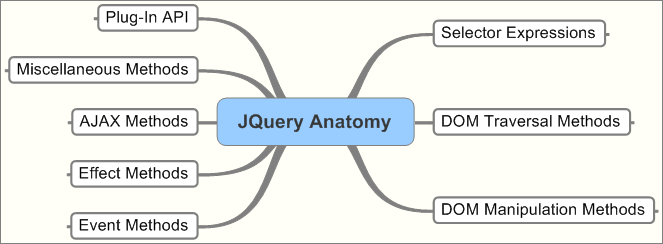
Setting up jQuery ready handler
jQuery lets you run your code when the page elements have been loaded. This is more efficient than the browser onload() functions, which is called only after all images have been loaded. To run the code when the page is ready you use the following syntaxHide Copy Code
$(document).ready(function() {
    ....
});

There's a shorthand as well

$(function() {
    ....
});
A Quick Demo
Let’s briefly have quick look at jQuery in action.
Selecting Page Elements by ID
The $(‘#id’) is used to select elements by id. When you click on the button “Stripe” the stripe() JS method is triggered which toggles the class of the element whose id matches ‘third’. On subsequent click the style will be reset.
The code and the markup is displayed below.Hide Shrink  Copy Code
<head>
	<title>Select a paragraph</title>

	<script type="text/javascript" src="jquery-1.3.2.min.js"></script>

	<script type="text/javascript">
		function stripe( )
		{
			$('#third').toggleClass('striped');
		}
	</script>

	<style>
		p.striped {
			background-color: cyan;
		}
	</style>

</head>
<body>
	<h1>Select a paragraph</h1>
	<div>
		<p>This is paragraph 1.</p>
		<p>This is paragraph 2.</p>
		<p id="third">This is paragraph 3.</p>
		<p>This is paragraph 4.</p>
	</div>
	<form>
		<input type = "button" value="Stripe" onclick="stripe()"> </input>
	</form>
</body>
Selecting a Set of Elements
The $(“div”) selects all div elements. The fadeIn() effect is applied to each div matched.
The div is hidden initially.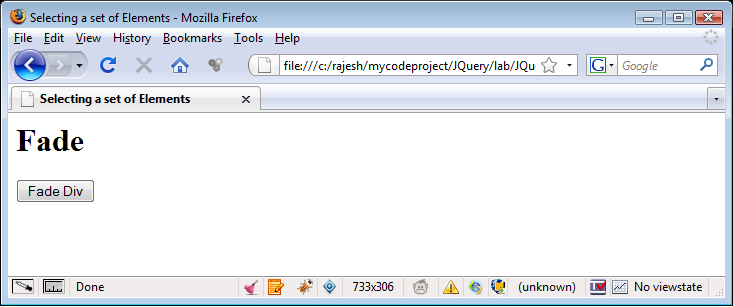
On clicking the button the all the div elements fades in slowly.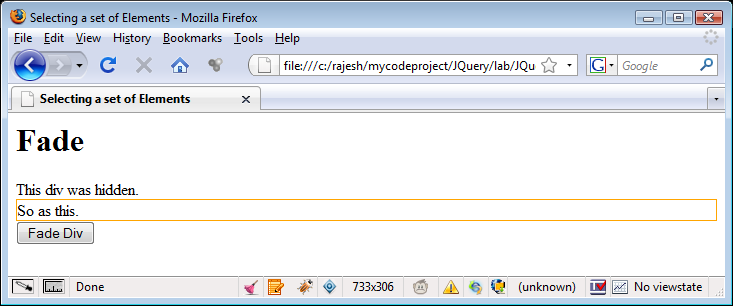
The code and the markup is displayed below.Hide Copy Code
<head>
    <title>Selecting a set of Elements</title>
    <script type="text/javascript" src="Scripts/jquery-1.3.2.min.js"></script>

    <script type="text/javascript">
        function fade() {
            $("div").fadeIn('slow');
        }
    </script>
</head>

<body>
    <h1>Fade</h1>
    <div style ="display:none">
         This div was hidden.
    </div>

    <div style ="display:none;border:solid 1px orange">
         So as this.
    </div>

    <form>
        <input type = "button" value="Fade Div" onclick="fade()" />
    </form>
</body>
Selecting Elements by Style
The $(p.mark) selects all paragraph elements with the class “mark”.

The code and the markup is displayed below.Hide Copy Code
<head>
<title>Select a paragraph</title>

<script type="text/javascript" src="Scripts/jquery-1.3.2.min.js"></script>

<script type="text/javascript">

    function highlight() {
        $('p.mark').toggleClass("highlight");
    }

</script>

<style type="text/css">

p.mark {
        font-weight: normal;
            }
    p.highlight {
        background-color: lightgray;
    }

</style>
</head>
Hide Copy Code
<body>
 <h1>Select a paragraph</h1>
 <div>
     <p class = "mark">This is paragraph 1.</p>
     <p>This is paragraph 2.</p>
     <p class = "mark">This is paragraph 3.</p>
     <p>This is paragraph 4.</p>
 </div>

 <input type = "button" value="Highlight" onclick="highlight()"/>
</body>
Digging deeper into jquery
The above discussion summed up the very basics of jQuery. The next sections dig deeper into jQuery based on the antomical structure outlined.

CSS Selectors
The CSS selectors are baed on the CSS 1-3 as outlined by the w3C. For additional information please visit w3.org
Selecting by Element
All elements selection takes the form of $(‘T’) where ‘T’ stands for the element tag name.
For e.g.
- $(‘div’) selects all elements with a tag name of div in the document
- $(‘input’) selects all elements with a tag name of input in the document.
jQuery uses the JavaScript’s getElementsByTagName() function for tag-name selectors.
Selecting by ID
This takes the form $(‘#id’) where ID equal to id.
For e.g.
- $(‘#firstName’) selects the unique element with id = ‘firstName’.
- $(‘div#main’) selects a single div with an id of ‘main’.
If there are more than one element with the same id then jQuery selects the first matched element in the DOM.
Selecting by Class
This takes the form $(‘.myclass’) where class equal to myclass.
For e.g.
- $(‘.blink’) selects all elements with class = ‘blink’.
- $(‘p.blink’) selects all paragraphs that have a class of blink.
- $(‘.mybold.myblink’) selects all elements that have a class of ‘mybold’ and ‘myblink’.
Performance wise the example 2 is preferable as it limits the query to a given tag name.
Selecting by Descendant (E1 E2)
Matches all elements matched by E2 that are descendants of an element matched by E1.
For e.g.
- $(‘#menu li’) selects all elements matched by <li> that are descendants of an element that has an id of menu.
- $(‘a img’) selects all elements matched by <img> that are descendants of an element matched by <a>
A descendant of an element is any element that is a child, grandchild and so on of that element.Hide Copy Code
 <div  id = "menu">
     <div id = "item1">
   <div id = "item-1.1">
   <div id = "item-1.2">
     <div id = "item-1.2.1"/>
   </div>
     </div>
</div>
In the above example “item-1.2.1” is a descendant of “item-1.2”, “item-1.1”, “item1″ and ‘menu”.
Selecting Child elements (E1 > E2)
Matches all elements matched by E2 that are children of an element matched by E1.
For e.g.
- $(‘li > ul’) selects all elements matched by <ul> that are children of an element matched by <li>.
- $(‘p > pre’) matches all elements matched by pre that are children of an element matched by<p>.
The child selector works in all modern browser except IE 6 and below. The child combinator is a more specific form of descendant
combinator as it selects only first-level descendants.
Adjacent Sibling (E1 + E2)
Matches all elements by E2 that immediately follow and have the same parent as an element matched by E1.
For e.g.
- $(‘p + img’) selects all elements matched by <img> that immediately follow a sibling element matched by <p>.
The + combinator selects only siblings i.e. elements at the same level as the matched element.
General Sibling (E1 ~ E2)
Matches all elements by E2 that follow and have the same parent as an element matched by E1.
For e.g.
- $(‘p ~ img’) selects all elements matched by <img> that follow a sibling element matched by <p>.
The difference between + and ~ is + combinator reaches only to the immediately following sibling element whereas the ~ combinator extends that reach to all following sibling elements as well.
Consider the following HTML.Hide Copy Code
<ul>
    <li class = "1st"></li>
    <li class = "2nd"></li>
    <li class = "3rd"></li>
</ul>
<ul>
    <li class = "4th"></li>
    <li class = "5th"></li>
    <li class = "6th"></li>
</ul>
$(‘li.1st ~ li) selects <li class = “2nd”> and <li class = “3rd”>.
$(li.1st + li) selects <li class = “2nd”>
Multiple Elements (E1, E2, E3)
Selects all elements matched by selector E1, E2 or E3.
For e.g.
- $(‘div, p, pre’) selects all elements matched by <div> or <p> or <pre>.
- $(‘p bold, .class-name) sleects all elements matched by <bold> that are descendants of <p> as well as all elements that have a class of ‘.class-name’.
The comma (,) combinator is an efficient way to select disparate elements.
Nth Child (:nth-child(n))
All elements that are the nth child of their parent.
For e.g.
- $(‘li:nth-child(3)’) selects all elements matched by <li> that are the 3rd child of their parent.
The ‘n’ is 1 based as this is strictly derived from the CSS specification. For all other selectors jQuery follows 0-based counting.
First Child (:first-child)
All elements that are the first child of their parent.
For e.g.
- $(li:first-child’) selects all elements matched by <li> that are the first child of their parent.
The :first-child pseudo-class is shorthand notation for :nth-child(1).
Last Child (:last-child)
All elements that are the last child of their parent.
For e.g.
- $(li:last-child’) selects all elements matched by <li> that are the last child of their parent.
Only Child (:only-child)
All elements that are the only child of their parent.
For e.g.
- $(‘:only-child’) selects all elements that are the only child of their parent.
- $(‘p:only-child’) sleects all elements matched by <p> that are the only child of their parent.
Not (:not(s))
All elements that do not match selector ‘s’.
For e.g.
- $(‘li:not (.myclass)’) selects all elements matched by <li> that do not have class=”myclass”.
- $(‘li:not(:last-child)’) selects all elements matched by <li> that are not the last child of their parent element.
Empty (:empty)
All elements that have no children (including text nodes).
For e.g.
- $(‘p:empty’) selects all elements matched by <p> that have no children.
- $(’empty’) selects all elements that have no children.
All Elements (*)
All elements
For e.g.
- $(‘*’) selects all elements in the document.
- $(p > ‘*’) selects all elements that are children of a paragraph element.
XPath Selectors
All elements that contain an element matched by E.
For e.g.
- $(‘div[p]’) selects all elements matched by <div> that contain an element matched by <p>.
This selector is like the reverse of the descendant selector (either E1 // E2 or E1 E2), in that it selects all elements that have a descendant element matched by E1 instead of all elements matched by E2 that are descendants of some other element.
Attribute Selectors
Attribute selectors begin with @ symbol before jQuery 1.3. After V1.3 remove the @symbol before the attribute name.
Has Attribute ([foo])
All elements that have foo attribute.
For e.g.
- $(‘a[rel]’) selects all elements matched by <a> that have a rel attribute.
- $(‘div[class]’) selects all elements matched by <div> that have a class attribute.
Attribute Value Equals ([foo=bar])
All elements that have the foo attribute with a value exactly equal to bar.
For e.g.
- $(‘a[rel=nofollow]’) selects all elements matched by <a> that have an attribute ‘rel’ with a value of ‘nofollow’.
- $(‘input[name=first-name]’) selects all elements matched by <input> that have a name value exactly equals to first-name.
Attribute Value Does Not Equal ([foo != bar])
All elements that do not have a foo attribute with a value exactly equal to bar.
For e.g.
- $(‘a[rel != nofollow]’) selects all elements matched by <a> that do not have an attribute ‘rel’ with a value of ‘nofollow’.
- $(‘input[name != first-name]’) selects all elements matched by <input> that do not have a name attribute with a value exactly equal to first-name.
NOTE: These selectors see attribute value as a single string. So, attributes with values separated by space will not be matched.
To exclude the following match <a rel=”nofollow self” href=…>link</a> use the following selector
$(‘a:not[rel *= nofollow])’).
Form Selector
The following is the form selector list
- :input -> selects all form elements (input, select, textarea, button).
- :text -> selects all text fields (type = “text”)
- :password -> selects all password fields (type = “password”)
- :radio -> selects all radio fields (type = “radio”)
- :checkbox -> selects all checkbox fields (type = “checkbox”)
- :submit -> selects all submit buttons (type = “submit”)
- :image -> selects all form images (type = “image”)
- :reset -> selects all reset buttons (type = “reset”)
- :button -> selects all other buttons (type = “button”)
- :file -> selects all <input type = “file”>
Custom Selector
Even element (:even) Odd eleemnt (:odd)
:even All elements with an even index
:odd All elements with an odd index
For e.g.
- $(‘li:even’) selects all elements matched by <li> that have an even index value.
- $(‘tr:odd’) selects all elements matched by <tr> that have an odd index value.
As the :even and :odd pseudo-classes match element based on their index, they use JS’s native zero-based numbering. So, even selects the first, third (and so on) elements while :odd selects teh second, fourth (and so on) elements.
Nth element (:eq(n), :nth(n))
The element with index value equal to n.
For e.g.
- $(‘li:eq(2)’) selects the third <li> element
- $(‘p:nth(1)’) selects teh second <p> element.
Greater than (:gt(n))
The elements with index greater than N.
For e.g.
- $(‘li:gt(1)’) selects all elements matched by <li> after the second one.
Less than (:lt(n))
The element with index value less to n.
For e.g.
- $(‘li:lt(3)’) selects all elements matched by <li> before the 4th one, in other words the first three <li> elements.
First (:first)
The first instance of an element.
For e.g.
- $(‘li:first’) selects the first <li> element.
- $(‘tr:first’) selects the first <tr> element.
Last (:last)
The last instance of an element.
For e.g.
- $(‘li:last’) selects the last <li> element.
- $(‘tr:last’) selects the last <tr> element.
Parent (:parent)
All elements that are parent of another element including text node.
For e.g.
- $(‘:parent’) selects all elements that are the parent of another element.
- $(‘td:parent’) selects all elements matched by <td> that are the parent of another element.
Contains (:contains(text))
All elements that contain the specified text.
For e.g.
- $(‘div:contains(sample div)’) selects all elements matched by <div> that contain the text ‘sample div’.
- $(‘li:contains(wrong link)’) selects all elements matched by <li> that contain the text ‘wrong link’.
The matching text can appear in the selector element or in any of that element’s descendants.
Visible (:visible)
All elements that are visible.
For e.g.
- $(‘div:visible’) select all elements matched by <div> that are visible.
The :visible selector includes elements that have a display of block or inline or any other value other than none and a visibility of visible.
Hidden (:hidden)
All elements that are hidden.
For e.g.
- $(‘div:hidden’) selects all elements matched by <div> that are hidden.
DOM
jQuery has a powerful jquery traversal and manipulation methods.
$() factory revisited
We have used the $() functionto access elements in a document. Let’s roll up our sleeves and try doing some trick with the $(). In fact simply inserting a snippet of HTMl code inside the parentheses, we can create an entirely new DOM structure. Isn’t this amazing.
Inserting new elements
The following are the jQuery methods for inserting/appending elements into the DOM.
.before(content)
Inserts content specified by the parameter before each element in the set of matched elements. The return vlaue is the jQuery object for chaining purposes. Consider the following HTML fragment.Hide Copy Code
<div class = "div1">
      This div already exist
</div>
Execute the following jquery script.Hide Copy Code
$('div.div1').before('<div class="insert">This div is dynamically inserted</div>')
The resulting HTML will beHide Copy Code
<div class = "insert">
	This div is dynamically inserted
</div>
<div class = "div1">
      This div already exist
</div>
.insertBefore(content)
Inserts every element in the set of matched elements before the set of elements specified in the parameter. Consider the following HTML fragment.Hide Copy Code
<div class = "div1">
      This div already exist
</div>
Execute the following jquery script.Hide Copy Code
$('<div class="insert">This div is dynamically inserted</div>').insertBefore('div.div1')
The resulting HTML will beHide Copy Code
<div class = "insert">
	This div is dynamically inserted
</div>
<div class = "div1">
      This div already exist
</div>
There is only structural difference in the way both the above function works.
.after(content)
Inserts content specified by the parameter after each element in the set of matched element. Consider the following HTML fragment.Hide Copy Code
<div class = "div1">
      This div already exist
</div>
Execute the following jquery script.Hide Copy Code
$('div.div1').after('<div class="insert">This div is dynamically inserted</div>')
The resulting HTML will beHide Copy Code
<div class = "div1">
      This div already exist
</div>
<div class = "insert">
	This div is dynamically inserted
</div>
.insertAfter(content)
Inserts every element in the set of matched elements after the set of elements specified in the parameter. Consider the following HTML fragment.Hide Copy Code
<div class = "div1">
      This div already exist
</div>
Execute the following jquery script.Hide Copy Code
$('<div class="insert">This div is dynamically inserted</div>').insertAfter('div.div1');
The resulting HTML will beHide Copy Code
<div class = "div1">
      This div already exist
</div>
<div class = "insert">
	This div is dynamically inserted
</div>
Playing with Events
Coming up soon
Effects and Animation
Coming up soon
Spicing website with Ajax
Let’s start with a small usecase in action. Let’s say you have a use case to add “Comment” to a blog post. The code snippet is writting for the ASP.NET MVC framework, but it should be seamless to modify it to suit it to work with classic asp.net, php, ror or anything you deem fit.
The comment view is very simple. The following is the minimal markup without any styles for adding a comment.Hide Copy Code
 <h2>Add Comment</h2>
<label for ="body">Body</label>
<br />
<%= Html.TextArea("body")%>

<div id = "loading-panel"></div>

<hr />
<input id="comment_submit" type="button" value = "Publish" />
The minimal code for the controller is shown below. When the “Publish” button is clicked we want to make a request to the PostController’s action method named “NewComment” in an asynchronous fashion. The code shown is only for demonstration purpose and as such has no meaning apart from the context of this discussion.Hide Copy Code
public class PostController : BaseController
{
    /// Add new comment
    /// <param name="postId">The post id.</param>
    /// <param name="body">The body.</param>
    public ActionResult NewComment(Guid postId, string body)
    {
        var post = Repository.GetPostById(postId);

        var comment = new Comment { Body = body, Post = post };
        Repository.AddComment(comment);

        return Content(body);
    }
}
Let’s set up the jQuery to enable posting back in an asynchronous way and also show a progress bar on the way.Hide Shrink Copy Code
<script type="text/javascript">
        function flashit()
	{
            flash('#comment-list li:last');
        }

	function flash(selector)
	{
		$(selector).fadeOut('slow').fadeIn('show');
	}
    </script><script type = "text/javascript">
        $(function() {
            $("#comment_submit").click(function()
	    {
                // Set up a string to POST parameters.  You can create the JSON string as well.

		var dataString = "postId=" + "<%=Model.Post.Id %>" + "&body=" + $('#body').val();  		 (01)

                $.ajax({											 (02)
                    type: "POST",										 (03)
                    url: "/Post/NewComment",                                                                     (04)
                    data: dataString,										 (05)
                    beforeSend: function(XMLHttpRequest) {							 (06)
                        $('#loading-panel').empty().html('<img src="http://www.codeproject.com/Content/Images/ajax-loader.gif" />');       (07)
                    },
                    success: function(msg) {								  	 (08)
                        $('#comment-list').append('<li>' + msg + '</li>');					 (09)
                        flashit();										 (10)
                    },
                    error: function(msg) {								  	 (11)
                        $('#comment-list').append(msg);
                    },
                    complete: function(XMLHttpRequest, textStatus) {					 	 (12)
                        $('#loading-panel').empty();								 (13)
                    }
                });
            });
        });
    </script>
In the above code the jQuery factory function $() sets up the “comment_submit” click event handler. Whenever the “submit” button is clicked the click function defined above is executed. The following points highlights what’s happening in the above function.
- Line 01 sets up the data to be posted to the controller.
- Line 02 invokes the ajax method with the following parameters.
- Line 03 sets the request type to “POST”.
- Line 04 sets up the URL. In this case the URL is Post Controller’s action method should be invoked.
- Line 05 assigns the data as part of the request.
- Line 06 sets up the beforeSend() handler. This method is executed just before the ajax method is invoked.
- Line 07 sets up the loading-panel to display a loading image. The image can be downloaded from http://www.ajaxload.info/.
- Line 08 sets up the success() handler. This method is executed if the AJAX request is sucessfully executed.
- Line 09 appends the new message to the comment-list div if the request executed successfully.
- Line 10 invokes the flashit() method which flashes/animates the inserted method.
- Line 11 sets up the error() handler. This method is executed if there are any errors while executing the AJAX request.
- Line 12 sets up the complete() handler. This method is executed after the AJAX request is completed.
- Line 13 empties the loading-panel to clear up the image.
AJAX Options
Coming up soon.
Generate Automatic TOC
Let’s quickly create an automated TOC for our page. Say we have a page with the following structure and we need to create a TOC based on the <h3> heading. We want to insert this TOC in the “header” div. All the TOC contents should link back to the content of the page.
HTML Snippet
Hide Shrink Copy Code
<div id="header">
    <h1>
        Automatic Bookmark Headings Example</h1>
    <h2>
        Using jQuery to Extract Existing Page Information</h2>
</div>
<div id="Div1">
    <h1>
        Automatic Bookmark TOC Example</h1>
    <h2>
        Using jQuery to Extract Existing Page Information</h2>
</div>
<div id="Div2">
    <h3>Introduction</h3>
    <p>
        Lorem ipsum dolor sit amet, consetetur sadipscing elitr, sed diam nonumy eirmod
        tempor invidunt ut labore et dolore magna aliquyam erat, sed diam voluptua. At vero
        eos et accusam et justo duo dolores et ea rebum. Stet clita kasd gubergren, no sea
        takimata sanctus est Lorem ipsum dolor sit amet.
    </p>
    <a href="#header" title="return to the top of the page">Back to top</a>
</div>
<div id="content">
    <h3>Content</h3>
    <p>
        Lorem ipsum dolor sit amet, consetetur sadipscing elitr, sed diam nonumy eirmod
        tempor invidunt ut labore et dolore magna aliquyam erat, sed diam voluptua. At vero
        eos et accusam et justo duo dolores et ea rebum. Stet clita kasd gubergren, no sea
        takimata sanctus est Lorem ipsum dolor sit amet.
    </p>
    <a href="#header" title="return to the top of the page">Back to top</a>
</div>
The TOC Generator Script
Hide Shrink Copy Code
<script type="text/javascript">
    $("document").ready(function() {
        createTOC('h3', 'header');
    });

    // tag : the header tag for which the toc is to be built
    // container : id of the div that we want to append the resulting TOC.
    function createTOC(tag, container) {
        var anchorCount = 0;  // count to create unique id

        // create an unordered list
        var oList = $("<ul id='bookmarksList'>");
        /*
        1. For each header tag create a named anchor and insert the into header tag.  It will
        serve as the jump location for the TOC.
        2. Add the link to the unordered list that will point to the named anchor.
        */

        /* Get all h3 inside div where id is not equal to header.
        // For each h3 tag
        //    1. Create the named anchor.  This should be a unique name.
        //    2. Set the html for h3 tag to a named anchor.
        //    3. Add the existing html for the h3 in front of the named anchor.
        //    4. Create the TOC links
        //    5. Add the TOC to the container.
        */
        $("div:not([id=header]) " + tag).each(function() {
            $(this).html("<a name='bookmark" + anchorCount + "'></a>" +
                    $(this).html());
            oList.append($("<li><a href='#bookmark" + anchorCount++ + "'>"
                    + $(this).text() + "</a></li>"));
        });
        $("#" + container).append(oList);
    }
</script>
Here the screenshot of this snippet in action
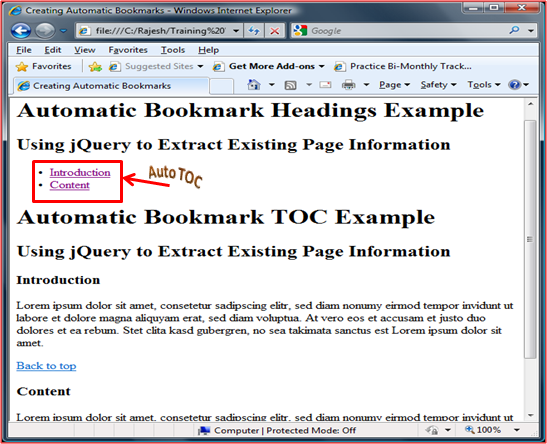
I think the code is well commented to guage the logic.
Limit text box entry
Lets quickly have a look at how you can limit the entry to textbox and display the character input left to be keyed in.Hide Copy Code
<script type="text/javascript">
    $(function() {
        var limit = 250;
        $('#dvLimit').text('250 characters left');
        $('textarea[id$=txtDemoLimit]').keyup(function() {
            var len = $(this).val().length;
            if (len > limit) {
                this.value = this.value.substring(0, limit);
            }
            $("#dvLimit").text(limit - len + " characters left");
        });
    });
</script>
The $() function does the following things on startup.
1. Set a variable to a limit of 250 characters.
2. Assign a default value to the “div” element with id “dvLimit”
3. Find the control that contains the id “txtDemoLimit” and hook up the keyup event.
4. In the keyup event get the length of the current text.
5. If len is greater than the limit set, set the text value as a substring within the specified limit.
6. Update the div with the no. of characters left to be keyed in.
The HTML is shown below.Hide Copy Code
<div id="dvLimit"></div>
<div>
    <asp:TextBox ID="txtDemoLimit" TextMode="MultiLine" Columns = "40" Rows = "10" runat="server"></asp:TextBox>
</div>
The following is the application in action.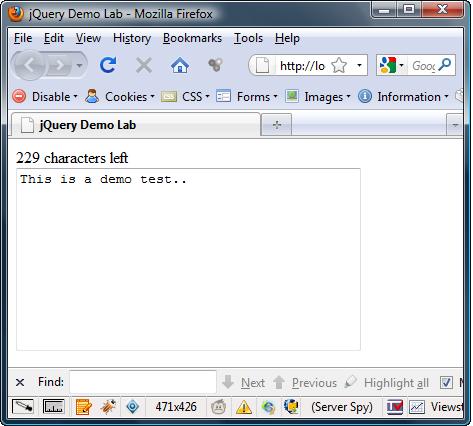
Create your own Custom filter(*new)
You can create your own custom filters that an be used with jQuery selectors. This provides a good way to extend jQuery.
Let’s create our own custom filter “:inline” which returns all elements whose display is set to “inline”.Hide Copy Code
(function ($) {
     // Define the custom filter by extending $.expr[':']
     $.expr[':'].inline = function(elem)  {
     	return $(elem).css('display') === 'inline';
     };
})(jQuery);
The above filter returns all elements which has a display style set to ‘inline’. There are other ways or methods to get his information but filters seem to make the whole experience pretty seamless.
Alternate ways to create the above filter.
Hide Copy Code
 // This syntax allows you to add multiple filters at one go...
 $.extend(
     jQuery.expr.filters,  {
        inline: function(elem) {
        return $(elem).css('display') === 'inline';
        }
     }
);
If you take a peek at the jQuery source code you will find that the the “jQuery.expr.filters” is just an alias for jQuery.expr[“:”]. The snippet is pasted below for reference.Hide Copy Code
jQuery.expr[":"] = jQuery.expr.filters;
I first read about this at Dissecting jQuery filters
Hope you can creatively expand on the jQuery filters and share your thoughts.
Plug with the Plug-In API
Coming up soon
Best Practices
As you may be aware by this time that there is more than one way to work with jQuery and the thing we have to try is to use the best method i.e. the most performant method. The following are some of the ways in which you can get maximum performance out of jQuery. Note I am not taking into consideration the browser, operating system, hardware and other things which may have some consequence on performance
- Latest VersionGet the latest version of jQuery. Since jQuery is in active development there will be plenty of fixes that will come up with each release.
- ContextPassing a context to the jQuery function can improve the query performance as this will reduce the number of DOM elements that are traversed. In order to do this you need to pass the jQuery function a second parameter which referes to a single DOM element. This element is then used as the starting point for the DOM querying and as a result there will be some performance benefits which the app may get.
In many situation you can use the this as the second parameter. Please do note that in order for a performance gain, you need to pass an actual DOM reference as the 2nd parameter. Passing anything other than a DOM reference still requires a search of the entire document actually may hinder performance.
- Selector PerformanceThis is one of the important design decision you need to take. The performance may be directly impacted by the selectors you use. The selector peformance is dependent upon the following points
- Complexity of the selector expression
- Type of selector
- Size and Complexity of the DOM that is being evaluated
- Prefer ID selector whenever possible.
- The simple the selector the better the performance
- If you have to use class name, always try to use it with other selector as well.
For. e.g. Use $(‘div.menu’) rather than $(‘.menu’) or something similar based on your requirement. - Since Simple DOM are traversed faster the context becomes much more important.
- Cache elements if they are used frequentNever duplicate the DOM queries for the same element/elements. Cache the result set and use it. This is more important when you are dealing with loops. Store the wrapped set in a local variable outside the loop so that you avoid querying during each iteration.>
- Keep DOM changes to minimumAs the previous tip this concept is important when dealing with loops. Avoid updating elements in the loop. Rather, create a string representation of the element in the loop and update the DOM outside the loop.Hide Copy Code// This code is slow var list = $(‘div’); for (i = 1; i <= 1000; i++) { list.append(‘Menu ‘ + i ); // interacts with the DOM 1000 times } // This code is a bit faster var list2 = $(‘div’); var items = ”; for (i = 1; i <= 100; i++) { items += ‘Menu ‘ + i ; // string concatenation } list2.html(items); // Use DOM only once. NOTE: string concatenation is slow but in this case it will be faster comparted to DOM manipulation. Also there are various optimized string library that peforms efficient concatenation.
- Use multiple selectors wherever possibleHide Copy CodePrefer $(‘#p1, #p2’).hide(); Rather than $(‘#p1’).hide(); $(‘#p2’).hide();
- Leverage chainingUse jQuery chaining when it makes sense. It increases the peforamance of the code and avoid needless repeatition.
More to come….
Modify this as per your requiement and enjoy jQuerying !!!
Building a poor man’s slide show app
In this update, let’s build a simple slide show app. We will keep the API simple to follow and may skip certain best practices for ease of understanding. But I will update the article with my observation of the recommended practices and may change the example to refer that.
Let’s begin at the beginning. Here is the HTML markup for your reference. A live demo is available on plunkr at http://plnkr.co/edit/OCnBecXAfhXAKbQExW2v?p=info
Here is the preview of what we will be building.
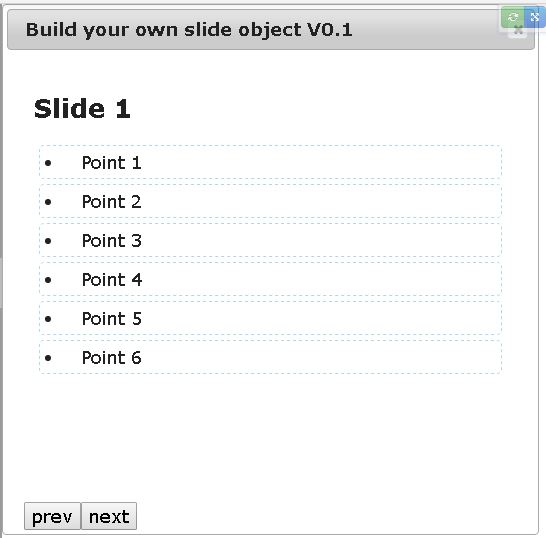
I have kept the CSS simple as I don’t wan’t to distract this article from the main topic. Add the latest reference to jQuery and jQuery UI (We will use the jQuery UI for showing the dialog box)Hide Copy Code
<body>
  <div id="board"></div>
</body>
First let’s build the API for the slide show module. This will enable us to understand how to design our library.Hide Copy Code
$(function () {
  mySlideShow.title("Build your own slide object V0.1",{elementId: "board", timer: 0})
    .slide({
      title: "Slide 1",
      points: ["Point 1","Point 2", "Point 3", "Point 4","Point 5", "Point 6" ]
    })
    .slide({
      title: "Slide 2",
      points: ["Point 3","Point 2"]
    })
    .slide({
      title: "Slide 3",
      points: ["Point 3","Point 3"]
    })
    .slide({
      title: "Slide 4",
      points: ["Point 4","Point 4"]
    })
    .show();
});
We haven’t yet coded the mySlideShow object. But let’s see what we are expecting from this object. We intend to invoke the slide show, by passing in a title, the elementID were the slides will be displayed, and a timer value. If the timer vaue is 0 the slides can be navigated by clicking on the “next” and “prev” button. The timer value is in milliseconds. If you give a timer value of 1000, then after 1000 seconds the slides will automatically changed.
NOTE: This is not a full fledged libray, but has enough information to cover the fundamentals. You can adapt this as per your requirement, style it the way you want it, add images etc.
NOTE: Also, please note this code is only in couple of iterations and as such I am aware of some ways to optimize this. The article may be updated in future but the idea now is get the MVP (Minimum Viable Product) feature ready :).
Note the functions are chained here. We can specify the slides and the points in the slides by using the slide() method which takes an object literal with a title and an array of points.
Now let’s see how the library/module is coded. First we wrap the entire library code in an IIFE (Immediately invoked function or also called as self invoking anonymous function). Note we are explicitly passing the global objects like window and jQuery to the function call (This is a best practice to avoid module/naming conflicts)Hide Copy Code
(function (window, $) {

    var mySlideShow = {
    };

    window.mySlideShow = mySlideShow;
})(window, jQuery);
Here’ is the full source code with detailed comment. If any part of the code is not clear please shout at me on the comments below. I will be adding more small examples like this.
Hide Shrink Copy Code
(function (window, $) {

  var mySlideShow = {
    $element: null,
    counter: 0,   // tracks which slide is currently selected
    slides: [],   // holds all slide object

    // The text to show in the title and the options object which contain
    // the elementID and the timer value.
    title: function (text, options){
      var elementId = options.elementId;
      this.timer = options.timer;

      this.$element = $("#" + elementId);

      // This will be displayed in the jquery UI dialog
      this.$element.attr("title", text);

      // Create the container and the footer divs
      this.$element.append("<div class='container'></div>");
      this.$element.append("<div class='footer'></div>");

      var $footer = $(".footer", this.$element);


      // Add the next and prev button to the footer div
      $footer.append("<input type='button' class='prev' value='prev'>");
      $footer.append("<input type='button' class='next' value='next'>");


      // Create the div for holding the slides
      $(".container").append("<div class='slides'></div>");

      // Call the initialize method
      this.onInit();

      // Setup the event handler. NOTE:  The repetation in the handlers can be
      // refactored later.
      this._next();   // setup next button click
      this._prev();

      return this;  // for method chaining
    },

    /*
      In the initialize method setup the timer and handle the windows resize
      event, so that as the window is resized the slides takes up the full screen.
    */
    onInit: function () {
      // Store a reference to the original object as otherwise in in time calls like
      // setInterval the context will change and "this" will point to global object.
      var that = this;

       if (that.timer) {
        setInterval(function(){
          that.next();
        },that.timer);
      }

      $(window).resize(function () {
         $(that.$element).css({
              'width': $(window).width(),
              'height': $(window).height(),
              'left': '0px',
              'top':'0px'
         });
      }).resize(); //<---- resizes on page ready
    },

    /*
      Given the index of the slide, show the slide.
    */
    load: function (index) {  //loads the slide based on index
      var that = this;
      var current = that.slides[index];
      var $slides = $("div.slides");

      $slides.html("");  // clear
      $slides.append("<h2>" + current.title + "</h2>");

      for(var i = 0; i < current.points.length; i++) {
        $slides.hide().append("<li>" + current.points[i] + "</li>").slideDown();  // lets animate
      }

    },

    /*
      Move to next slide.
    */
    next: function () {
      var that = this;
      that.counter ++;
      if (that.counter >= that.slides.length) {
        that.counter = 0;  // reset the counter if on last slide.
      }
      that.load(that.counter);  // load the slide
    },

    /*
      Move to prev slide.
    */
    prev: function () {
      var that = this;
      that.counter --;
        if (that.counter < 0) {
          that.counter = 0;  // reset the counter, if first slide reached.
        }
        that.load(that.counter);  // load the slide
    },

    // Event handler to track the click of next button
    _next: function () {
      var that = this;
      $(".next").on("click", function (e) {
        that.next();
      })
    },
    // Event handler to track the click of prev button
    _prev: function () {
       var that = this;
      $(".prev").on("click", function (e) {
        that.prev();
      })
    },

    /*
      Create the array for storing slide objects
    */
    slide: function (options) {
      this.slides.push(options);
      return this;  // for method chaining
    },

    /*
      Show the lide first time, by invoking the jQuery UI
      modal dialog.
    */
    show: function () {
      this.load(0);  // load the first slide

      this.$element.dialog({
        height: $(window).height()-10,
        width: $(window).width()-10,
        modal: true
      });
    }
  };

  window.mySlideShow = mySlideShow;
})(window, jQuery);
Here’s some screen shots with pointers to the code and the slide show in action.

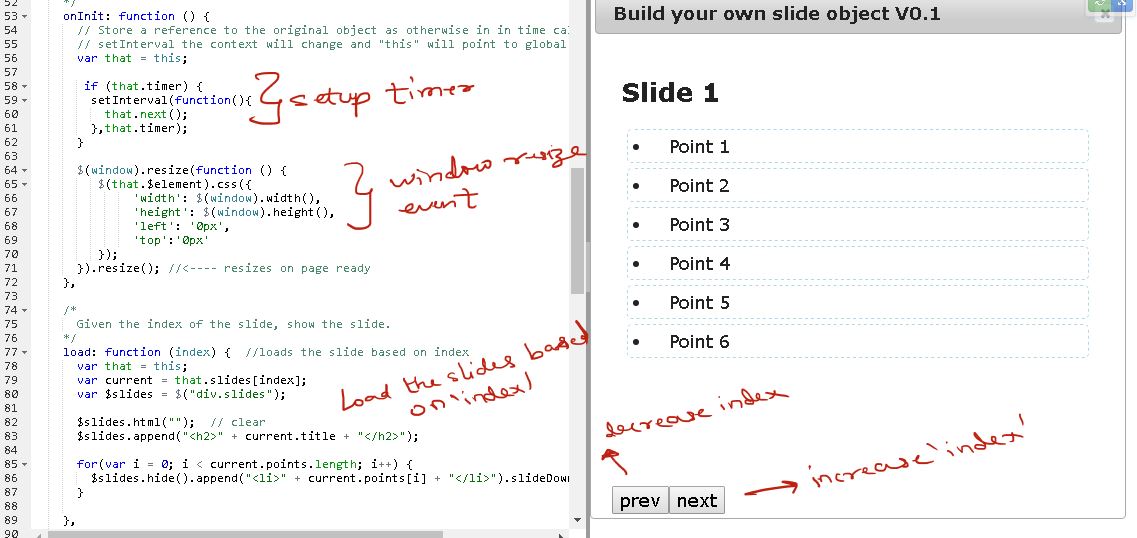
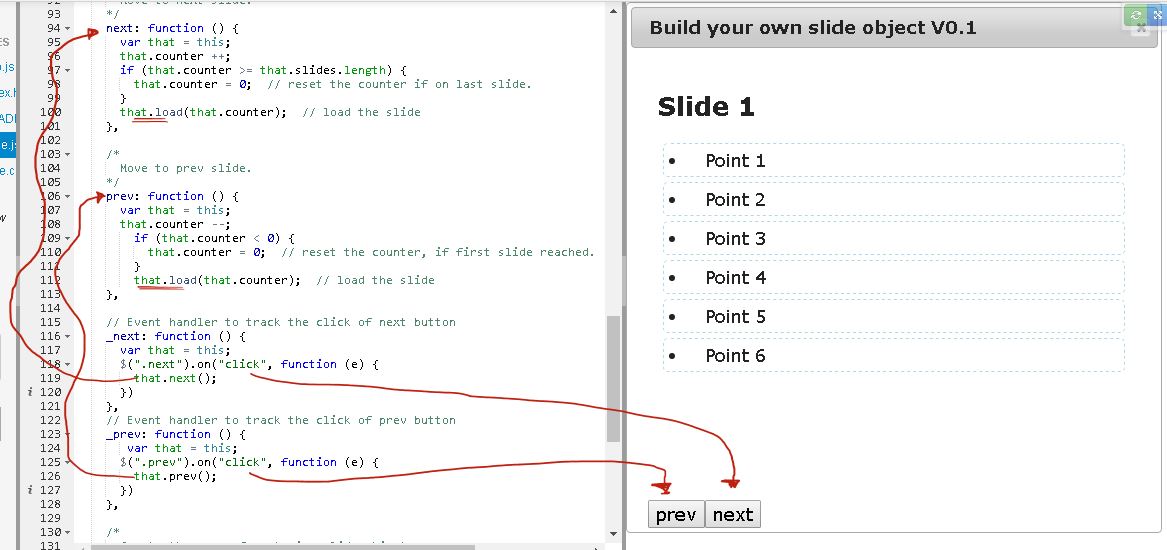
P.S: I definitely plan on updating and adding, reviewing, correcting contents based on latest changes.
Building a treeview plugin
Assume you the following unordered list of data, which needs to be rendered as a treeview.Hide Shrink Copy Code
<div class="tree">
    <ul>
        <li><a>First Level</a>
            <ul>
                <li><a>Second Level</a></li>
                <li><a>Second Level</a></li>
                <li><a>Second Level</a></li>
            </ul>
        </li>
        <li><a>First Level</a>
            <ul>
                <li><a>Second Level</a>
                    <ul>
                        <li><a>Third Level</a></li>
                        <li><a>Third Level</a></li>
                        <li><a>Third Level</a>
                            <ul>
                                <li><a>Fourth Level</a></li>
                                <li><a>Fourth Level</a></li>
                                <li><a>Fourth Level</a>
                                    <ul>
                                        <li><a>Fifth Level</a></li>
                                        <li><a>Fifth Level</a></li>
                                        <li><a>Fifth Level</a></li>
                                    </ul>
                                </li>
                            </ul>
                        </li>
                    </ul>
                </li>
                <li><a>Second Level</a></li>
            </ul>
        </li>
        <li><a>First Level</a>
            <ul>
                <li><a>Second Level</a></li>
                <li><a>Second Level</a></li>
            </ul>
        </li>
    </ul>
</div>
We want to invoke out custom jquery plugin as shown below.Hide Copy Code
 <script>
    $(function() {
        $(".tree").quickTree({
            onNodeClick: onclick
        });
    })

    function onclick(el) {
        console.log(el);
    }
</script>
We will create a jquery plugin named “quickTree” that can be invoked on any existing element. For this example I have made it work with a unordered list, but you can modify the code to suite to your requirement, add images,labels etc.
The code for the jquery plugin is give below and also a working plnkr url is sharedHide Shrink Copy Code
(function( $ ) {
    $.fn.quickTree = function(options) {
      // Establish our default settings
        var settings = $.extend({
            color        : "#ddffdd",
        }, options);

       return this.each(function() {
          var ele = $(this);

          $(ele).find('li' ).each( function() {
              if( $( this ).children( 'ul' ).length > 0 ) {
                  $( this ).addClass( 'parent' );
              }
          });

           $(ele).find('li > a' ).click( function( ) {
              if ($(this).parent().hasClass("parent")) {
                $( this ).parent().toggleClass( 'active' );
                $( this ).parent().children( 'ul' ).slideToggle( 'fast' );
              }
              if (settings.onNodeClick){
               settings.onNodeClick(this);
              }
           });
        });
    };

}( jQuery ));
The working url is here jQuery Treeview demo
History
- March 12, 2018- Added jquery custom treeview plugin (explanation pending)
- December 18, 2016- Added note regarding attribute selector. @symbol is no longer required after jQuery 1.3 version.
- December 16, 2016 – Added the slide show module example
- August 31, 2010 – Create your own Custom filter
- May 22, 2010 – Performance Best Practices.
- December 06, 2009 – Limit text input entry.
- September 15, 2009 – Generate Automatic TOC.
- August 24, 2009 – Added a simple AJAX use case.
- August 23, 2009 – Created the first version of the article.